

Media
Images, SVG, video and Lottie animations.
Images
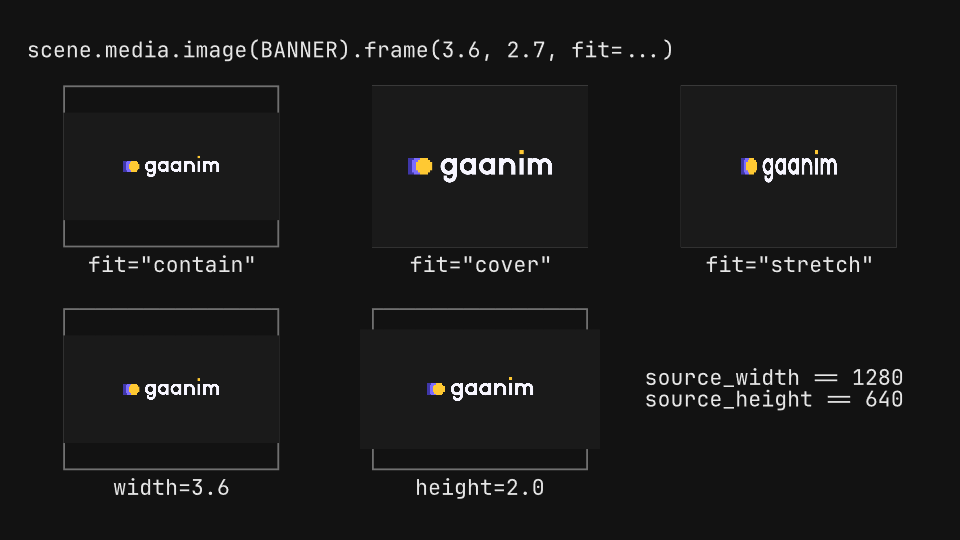
Raster images fitted to a frame in every mode, cropped by pixels or fractions, panned and zoomed by animating the crop, and sampled at every quality.
View on GitHub
gaanim examples/media/images.pyCode · 147 lines
"""Images: fitting a raster image to a frame, cropping it, panning and zooming inside it, and sampling quality.

Every image sits in an outline of the frame it is given, so the fit modes
show what they keep and what they cut. Each crop is shown twice: the whole
image with the crop window on it, and the cropped image in its frame.
Animating the crop pans and zooms inside the same frame.
"""

import os

from gaanim import Scene, Zones

BANNER = "assets/banner.png"  # 1280 x 640 pixels
BADGE = "assets/badge.png"  # 512 x 512 pixels of pixel art

scene = Scene()
accent = scene.canvas.color("accent")
rule = scene.canvas.color("rule")


def code(text, zone, anchor="left"):
    return scene.text(text, role="code").place(zone, anchor=anchor)


def outline(center, width, height):
    """Outline a frame of ``width`` x ``height`` around ``center``."""
    scene.geometry.rect(width, height).no_fill().stroke(rule, 0.03).move_to(*center)


# fit decides how the image meets its frame: contain keeps it whole (with
# empty bands), cover fills the frame and cuts what overflows, stretch
# distorts it. Given only a width or only a height, the other follows the
# image's proportions, which source_width and source_height also give.
scene.segment("fit")
W, H = 3.6, 2.7
page = scene.layout.zones(Zones.rows(["1fr", "10fr"], gap="24px", padding="page_padding"))
code(f"scene.media.image(BANNER).frame({W}, {H}, fit=...)", page[0])
cells = page[1].split(Zones.grid(rows=2, columns=3, row_gap="36px", column_gap="48px"))
stages = []
for cell, text in zip(cells, ['fit="contain"', 'fit="cover"', 'fit="stretch"', f"width={W}", "height=2.0", None]):
    stage, caption = cell.split(Zones.rows(["5fr", "1fr"], gap="12px"))
    if text:
        code(text, caption, "top")
    stages.append(stage)
for stage, fit in zip(stages, ["contain", "cover", "stretch"]):
    outline(stage.center, W, H)
    scene.media.image(BANNER).frame(W, H, fit=fit).move_to(*stage.center)
outline(stages[3].center, W, H)
scene.media.image(BANNER, width=W).move_to(*stages[3].center)
outline(stages[4].center, W, H)
banner = scene.media.image(BANNER, height=2.0).move_to(*stages[4].center)
# The source size of the banner beside it, whatever its frame.
code(f"source_width == {banner.source_width}\nsource_height == {banner.source_height}", stages[5], "left")
scene.wait(1.0)


def crop_rows(header, entries):
    """One row per entry: its code, the whole badge with the crop window, and the cropped badge.

    ``entries`` are (label, window, build) where ``window`` is the crop in
    fractions (x, y, width, height from the top-left) and ``build(size)``
    returns the cropped image. Returns each row's window and thumbnail
    geometry, for animating the window.
    """
    page = scene.layout.zones(Zones.rows(["1fr", "10fr"], gap="24px", padding="page_padding"))
    code(header, page[0])
    grid = page[1].split(Zones.grid(rows=len(entries), columns=["7fr", "2fr", "2fr"], row_gap="24px",
                                    column_gap="48px"))
    rows = []
    for index, (text, window, build) in enumerate(entries):
        label, whole, cropped = grid[3 * index], grid[3 * index + 1], grid[3 * index + 2]
        code(text, label, "right")
        size = min(whole.width, whole.height)
        scene.media.image(BADGE, width=size, height=size).move_to(*whole.center)
        outline(cropped.center, size, size)
        build(size).move_to(*cropped.center)
        rows.append((frame_window(whole.center, size, window), whole.center, size))
    return rows


def frame_window(center, size, window):
    """The crop ``window`` (fractions from the top-left, y down) drawn over an image of ``size``."""
    x, y, width, height = window
    left, top = center[0] - size / 2, center[1] + size / 2
    rect = scene.geometry.rect(size * width, size * height).no_fill().stroke(accent, 0.05)
    return rect.move_to(left + size * (x + width / 2), top - size * (y + height / 2))


# crop selects source pixels, from the top-left corner with y down, or
# fractions of the image with normalized=True. The frame stays the same.
scene.segment("crop")
crop_rows("scene.media.image(BADGE, width=size, height=size, crop=...)", [
    ("crop=(0, 0, 256, 256)", (0, 0, 0.5, 0.5),
     lambda size: scene.media.image(BADGE, width=size, height=size, crop=(0, 0, 256, 256))),
    ("crop=(256, 128, 256, 256)", (0.5, 0.25, 0.5, 0.5),
     lambda size: scene.media.image(BADGE, width=size, height=size, crop=(256, 128, 256, 256))),
    (".crop(0.25, 0.25, 0.5, 0.5, normalized=True)", (0.25, 0.25, 0.5, 0.5),
     lambda size: scene.media.image(BADGE, width=size, height=size).crop(0.25, 0.25, 0.5, 0.5, normalized=True)),
])
scene.wait(1.0)

# Animating the crop moves its window from the whole image: a zoom, a pan
# between two crops, and a zoom into a detail.
scene.segment("pan_zoom")
TARGETS = [(0.5, 0, 0.5, 0.5), (0, 0.5, 0.5, 0.5), (0.4, 0.25, 0.125, 0.125)]
images = []


def uncropped(size):
    images.append(scene.media.image(BADGE, width=size, height=size))
    return images[-1]


rows = crop_rows("image = scene.media.image(BADGE, width=size, height=size)", [
    (f"image.animate.crop({x}, {y}, {w}, {h},\n                   normalized=True)", (0, 0, 1, 1), uncropped)
    for x, y, w, h in TARGETS
])
scene.wait(0.4)
moves = []
for image, (window, center, size), (x, y, w, h) in zip(images, rows, TARGETS):
    moves.append(image.animate.crop(x, y, w, h, normalized=True))
    left, top = center[0] - size / 2, center[1] + size / 2
    moves.append(window.animate.move_to(left + size * (x + w / 2), top - size * (y + h / 2)))
    moves.append(window.animate.scale_to_3d(w, h, 1))
scene.play(moves, duration=1.6)
scene.wait(0.6)

# quality picks how pixels are sampled when an image is drawn larger than
# its source: nearest pixel (low), bilinear (medium, the default) or
# bicubic (high). Here 24 x 24 pixels of the badge fill each frame.
scene.segment("quality")
S = 3.6
page = scene.layout.zones(Zones.rows(["1fr", "10fr"], gap="24px", padding="page_padding"))
code(f"scene.media.image(BADGE, width={S}, height={S}, crop=(244, 120, 24, 24), quality=...)", page[0])
cells = page[1].split(Zones.columns(3, gap="48px"))
for cell, quality in zip(cells, ["low", "medium", "high"]):
    stage, caption = cell.split(Zones.rows(["5fr", "1fr"], gap="12px"))
    code(f'quality="{quality}"', caption, "top")
    scene.media.image(BADGE, width=S, height=S, crop=(244, 120, 24, 24), quality=quality).move_to(*stage.center)
scene.wait(1.0)

if snapshots := os.environ.get("GAANIM_SNAPSHOTS"):
    # The fits, the crops, the pan and zoom before, during and after, the qualities.
    scene.snapshots(snapshots, [0.5, 1.5, 2.2, 3.0, 4.2, 4.8])
else:
    scene.render()
Svg
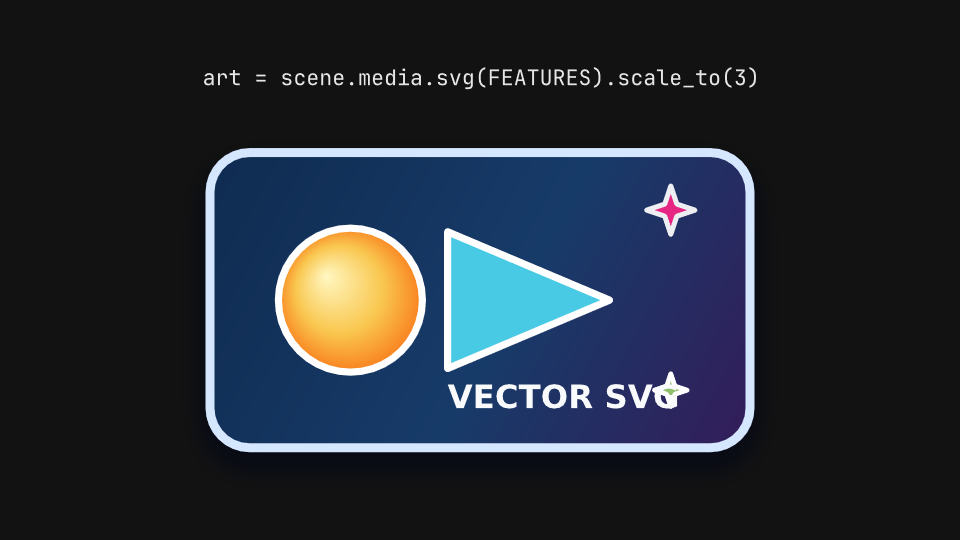
SVG files imported with their gradients, clip paths and filters, drawn in with write, create and fade_in, and parts addressed by id, restyled and animated.
View on GitHub
gaanim examples/media/svg.pyCode · 90 lines
"""SVG: vector files imported as drawables, drawn in like any shape, with their parts addressed by id.

An SVG keeps its gradients, clip paths, filters, text outlines and reused
elements, and comes in at 100 SVG pixels per scene unit. Its elements
become parts named by their ids, which can be restyled and animated alone.
Each label is the code that builds its variant.
"""

import os

from gaanim import Scene, Zones

FEATURES = "assets/features.svg"  # 360 x 220 px: gradients, clip paths, filters, <use>
CHARACTER = "assets/character.svg"  # parts: head, face, torso, left-arm, right-arm, legs

scene = Scene()
accent = scene.canvas.color("accent")
success = scene.canvas.color("success")

DRAW = 1.4
HOLD = 0.6


def columns(labels, rows=1, bands=("1fr", "7fr")):
    """A padded grid with a code label above each cell; return the stages under the labels."""
    grid = scene.layout.zones(
        Zones.grid(rows=rows, columns=len(labels) // rows, gap="48px", padding="page_padding")
    )
    stages = []
    for cell, label in zip(grid, labels):
        top, stage = cell.split(Zones.rows(list(bands)))
        scene.text(label, role="code").place(top, anchor="bottom")
        stages.append(stage)
    return stages


# The whole file is one drawable: scale_to resizes it with its own stroke
# widths, and part(id) reaches any element that has an id.
scene.segment("import")
(stage,) = columns(['art = scene.media.svg(FEATURES).scale_to(3)'])
art = scene.media.svg(FEATURES).scale_to(3).move_to(*stage.center)
scene.wait(0.3)
scene.play([
    art.part("orb").animate.indicate(),
    art.part("spark-top").animate.rotate_by(0.8),
    art.part("spark-bottom").animate.rotate_by(-0.8),
], duration=DRAW)
scene.wait(HOLD)

# An SVG draws in like any drawable: write and create trace its contours
# and then fill them, fade_in brings it in whole.
scene.segment("drawing")
stages = columns(["svg.animate.write()", "svg.animate.create()", "svg.animate.fade_in()"])
figures = [scene.media.svg(CHARACTER).scale_to(1.5).move_to(*stage.center) for stage in stages]
scene.play(
    [figures[0].animate.write(), figures[1].animate.create(), figures[2].animate.fade_in()],
    duration=DRAW,
)
scene.wait(HOLD)

# Parts are drawables too: a fill or stroke set on one restyles that
# element only, and a part animates without moving the rest.
scene.segment("parts")
stages = columns([
    'svg.part("torso")\n    .fill(success)',
    'svg.part("right-arm")\n    .stroke(accent, 0.06)',
    'svg.part("head")\n    .animate.scale_to(1.3)',
    'svg.part("face")\n    .animate.fade_out()',
], rows=2, bands=("2fr", "5fr"))
people = [scene.media.svg(CHARACTER).scale_to(1.1).move_to(*stage.center) for stage in stages]
people[0].part("torso").fill(success)
people[1].part("right-arm").stroke(accent, 0.06)
scene.wait(0.3)
scene.play([people[2].part("head").animate.scale_to(1.3), people[3].part("face").animate.fade_out()], duration=DRAW)
scene.wait(HOLD)

IMPORT_END = 0.3 + DRAW + HOLD
DRAWING_END = IMPORT_END + DRAW + HOLD
if snapshots := os.environ.get("GAANIM_SNAPSHOTS"):
    # The import before and while its parts move; each drawing midway and
    # done; the restyled parts and the animated ones midway and done.
    scene.snapshots(
        snapshots,
        [0.2, 0.3 + DRAW / 2, IMPORT_END - 0.1]
        + [IMPORT_END + DRAW * 0.4, DRAWING_END - 0.1]
        + [DRAWING_END + 0.2, DRAWING_END + 0.3 + DRAW / 2, DRAWING_END + 0.3 + DRAW + HOLD - 0.1],
    )
else:
    scene.render()
Video
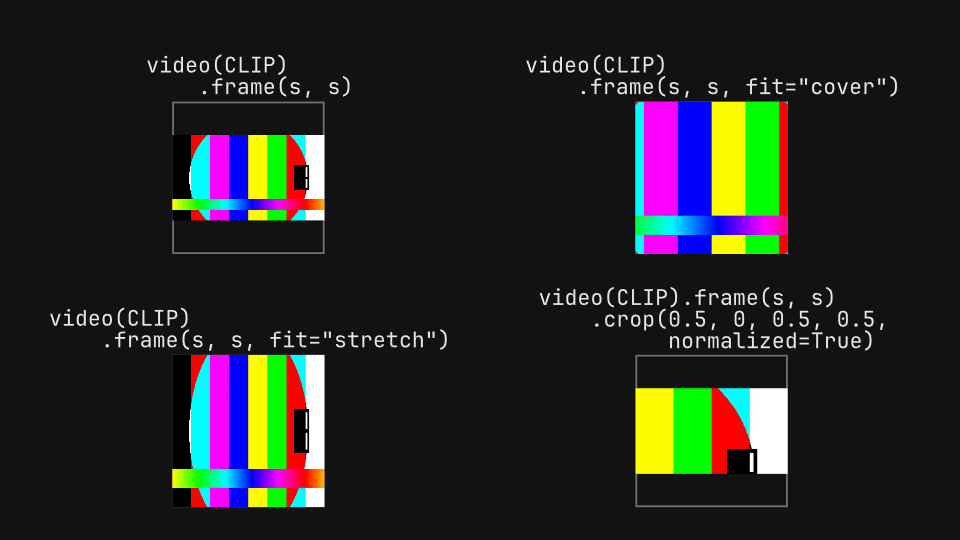
MP4 clips synchronized with the timeline: fitted and cropped, trimmed, looped, sped up and slowed down, and cut into segments.
Code · 104 lines
"""Video: MP4 clips synchronized with the timeline, framed and cropped, trimmed, looped, sped up and cut into segments.

A video plays from the play call that includes it, so seeks, previews and
exports all show the same frame. The clip here shows its own timestamp,
which makes every offset, speed and loop visible. Each label is the code
that builds its variant.
"""

import os

from gaanim import Scene, Zones

CLIP = "assets/clip.mp4"  # 480 x 270 px, 4 seconds at 30 fps, with a tone

scene = Scene()
rule = scene.canvas.color("rule")
HOLD = 0.6


def cells(labels, bands=("2fr", "7fr")):
    """A padded 2 x 2 grid with a code label above each cell; return the stages."""
    grid = scene.layout.zones(Zones.grid(rows=2, columns=2, gap="48px", padding="page_padding"))
    stages = []
    for cell, label in zip(grid, labels):
        top, stage = cell.split(Zones.rows(list(bands)))
        scene.text(label, role="code").place(top, anchor="bottom")
        stages.append(stage)
    return stages


# frame() fits the clip to a box like an image: contain keeps it whole,
# cover fills the box and cuts the rest, stretch distorts it. crop()
# keeps a window of the source. Each square box is outlined.
scene.segment("framing")
stages = cells([
    "video(CLIP)\n    .frame(s, s)",
    'video(CLIP)\n    .frame(s, s, fit="cover")',
    'video(CLIP)\n    .frame(s, s, fit="stretch")',
    "video(CLIP).frame(s, s)\n    .crop(0.5, 0, 0.5, 0.5,\n          normalized=True)",
], bands=("3fr", "7fr"))
fits = ["contain", "cover", "stretch", "contain"]
videos = []
for stage, fit in zip(stages, fits):
    side = stage.height * 0.95
    scene.geometry.rect(side, side).no_fill().stroke(rule, 0.03).move_to(*stage.center)
    video = scene.media.video(CLIP, audio=False).frame(side, side, fit=fit)
    videos.append(video.move_to(*stage.center))
videos[3].crop(0.5, 0, 0.5, 0.5, normalized=True)
scene.play(videos)
scene.wait(HOLD)

# offset and duration choose the source seconds, loop repeats them and
# speed plays faster or slower (the audio keeps its pitch). A finite clip
# lasts its output duration; a looping one runs until the scene moves on.
scene.segment("timing")
stages = cells([
    "video(CLIP, offset=1, duration=2)",
    "video(CLIP, duration=1, loop=True)",
    "video(CLIP, speed=0.5)",
    "video(CLIP, speed=2, volume=0.3)",
])
timed = [
    scene.media.video(CLIP, offset=1, duration=2, audio=False),
    scene.media.video(CLIP, duration=1, loop=True, audio=False),
    scene.media.video(CLIP, speed=0.5, audio=False),
    scene.media.video(CLIP, speed=2, volume=0.3),
]
for video, stage in zip(timed, stages):
    video.frame(stage.width * 0.9, stage.height * 0.9).move_to(*stage.center)
scene.play(timed)
scene.wait(HOLD)

# segment() plays a stretch of the source as its own play, at its own
# speed, so one clip can be cut and reordered across the timeline.
scene.segment("segments")
(stage,) = scene.layout.zones(Zones.rows(1, padding="page_padding"))
top, rest = stage.split(Zones.rows(["2fr", "5fr"], gap="24px"))
scene.text(
    "scene.play([clip.segment(start=0, end=1, speed=2)])\n"
    "scene.play([clip.segment(start=3, end=4)])\n"
    "scene.play([clip.segment(start=1, end=2)])",
    role="code",
).place(top, anchor="left")
clip = scene.media.video(CLIP, audio=False).frame(rest.width, rest.height).move_to(*rest.center)
scene.play([clip.segment(start=0, end=1, speed=2)])
scene.wait(0.3)
scene.play([clip.segment(start=3, end=4)])
scene.wait(0.3)
scene.play([clip.segment(start=1, end=2)])
scene.wait(HOLD)

FRAMING_END = 4 + HOLD
TIMING_END = FRAMING_END + 8 + HOLD
if snapshots := os.environ.get("GAANIM_SNAPSHOTS"):
    # The framings at two moments; the timings at three; each segment midway.
    scene.snapshots(
        snapshots,
        [1.0, 3.5]
        + [FRAMING_END + t for t in (0.5, 1.5, 3.5)]
        + [TIMING_END + 0.25, TIMING_END + 0.5 + 0.3 + 0.5, TIMING_END + 0.5 + 0.3 + 1 + 0.3 + 0.5],
    )
else:
    scene.render()
Lottie
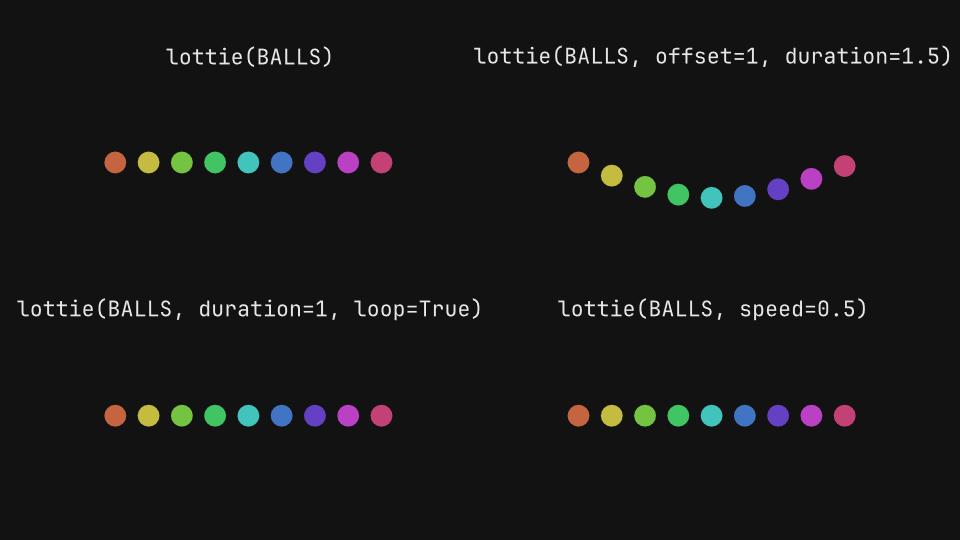
Lottie JSON clips trimmed, looped and sped up, drawn in before they play, and a dotLottie state machine driven by inputs, events and themes.
View on GitHub
gaanim examples/media/lottie.pyCode · 113 lines
"""Lottie: vector animations from Lottie JSON and dotLottie packages, played on the timeline, drawn in and driven by state machines.

A Lottie clip shows its first frame until a play call starts it, then
follows the scene clock, seeks included. A dotLottie package can also hold
several animations, themes and a state machine whose inputs and events are
set at the cursor. Each label is the code that builds its variant.
"""

import os

from gaanim import Scene, Zones

BALLS = "assets/balls.json"  # 1920 x 1080, 4.15 seconds at 60 fps
TOGGLE = "assets/toggle.lottie"  # animations idle and active, theme gold, state machine main

scene = Scene()
accent = scene.canvas.color("accent")

HOLD = 0.6


def cells(labels, rows=2, columns=2):
    """A padded grid with a code label above each cell; return the stages."""
    grid = scene.layout.zones(Zones.grid(rows=rows, columns=columns, gap="48px", padding="page_padding"))
    stages = []
    for cell, label in zip(grid, labels):
        top, stage = cell.split(Zones.rows(["1fr", "5fr"]))
        scene.text(label, role="code").place(top, anchor="bottom")
        stages.append(stage)
    return stages


def balls(stage, **options):
    """The balls animation fitted to ``stage``."""
    return scene.media.lottie(BALLS, width=stage.width, height=stage.height, **options).move_to(*stage.center)


# offset and duration choose the source seconds, loop repeats them and
# speed plays faster or slower; a finite clip lasts its output duration.
scene.segment("playback")
stages = cells([
    "lottie(BALLS)",
    "lottie(BALLS, offset=1, duration=1.5)",
    "lottie(BALLS, duration=1, loop=True)",
    "lottie(BALLS, speed=0.5)",
])
clips = [
    balls(stages[0]),
    balls(stages[1], offset=1, duration=1.5),
    balls(stages[2], duration=1, loop=True),
    balls(stages[3], speed=0.5),
]
scene.wait(0.3)
scene.play(clips)
scene.wait(HOLD)

# Before it plays, a clip can be drawn in like a shape: write and create
# trace its contours and then fill them, fade_in brings it in whole.
scene.segment("drawing")
stages = cells(
    ["clip.animate.write()", "clip.animate.create()", "clip.animate.fade_in()"], rows=1, columns=3
)
drawn = [balls(stage) for stage in stages]
scene.play([drawn[0].animate.write(), drawn[1].animate.create(), drawn[2].animate.fade_in()], duration=1.2)
scene.play(drawn)
scene.wait(HOLD)

# A dotLottie state machine runs while the scene waits: set_input and
# fire_event change its state at the cursor, and set_theme swaps the
# package's colors. The call that is in effect is lit.
scene.segment("state_machine")
(stage,) = scene.layout.zones(Zones.rows(1, padding="page_padding"))
left, right = stage.split(Zones.columns(["3fr", "2fr"], gap="96px"))
steps = left.split(Zones.rows(5, gap="24px"))
CALLS = [
    'clip = scene.media.lottie(\n    TOGGLE, state_machine_id="main")',
    'clip.set_input("active", True)',
    'clip.set_theme("gold")',
    'clip.fire_event("reset")',
    "clip.set_theme(None)",
]
labels = [scene.text(call, role="code").place(row, anchor="right") for row, call in zip(steps, CALLS)]
toggle = scene.media.lottie(TOGGLE, state_machine_id="main", width=right.width * 0.8).move_to(*right.center)
labels[0].fill(accent)
scene.play([toggle.animate.write().duration(0.75)])
scene.play([toggle])
scene.wait(0.75)
for index, change in enumerate([
    lambda: toggle.set_input("active", True),
    lambda: toggle.set_theme("gold"),
    lambda: toggle.fire_event("reset"),
    lambda: toggle.set_theme(None),
], start=1):
    change()
    labels[index - 1].fill(scene.canvas.color("foreground"))
    labels[index].fill(accent)
    scene.wait(1.0)

PLAYBACK_END = 0.3 + 4.15 * 2 + HOLD
DRAWING_END = PLAYBACK_END + 1.2 + 4.15 + HOLD
STATES = DRAWING_END + 0.75 + 0.75
if snapshots := os.environ.get("GAANIM_SNAPSHOTS"):
    # Playback at three moments; the drawings midway and the clips playing;
    # the state machine after every change.
    scene.snapshots(
        snapshots,
        [0.2, 1.5, 3.5]
        + [PLAYBACK_END + 0.5, PLAYBACK_END + 1.2 + 1.5]
        + [STATES - 0.1] + [STATES + index + 0.6 for index in range(4)],
    )
else:
    scene.render()