

Text
Typography, code blocks, Typst layouts and animated text.
Typography
Text roles, style keywords, spacing, styled parts, inline markup and math, paragraph alignment and wrapping, anchors and selections.
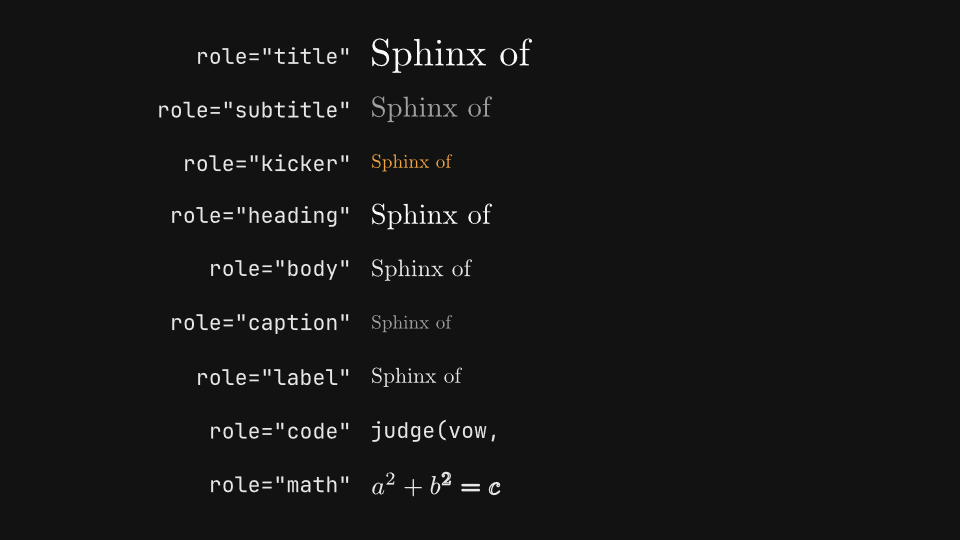
gaanim examples/text/typography.pyCode · 248 lines
"""Typography: text roles, style, spacing, parts, inline markup, paragraphs, anchors and selections.

Each segment covers one part of ``scene.text``: the theme's text roles, the
style keywords, spacing, locally styled parts, a root style, inline markup
and math, paragraph alignment, wrapping and line limits, anchors, and
selections that restyle part of a text. Each label is the code that styles
the sample next to it.
"""

import os

from gaanim import Anchor, Scene, TextAnchor, TextFlow, TextStyle, Zones, part

WRITE = 0.8
HOLD = 1.2
GAP = 0.2
SAMPLE = "Sphinx of black quartz"
PARAGRAPH = "Typography arranges type so that written language is legible, readable and appealing."

scene = Scene()
accent = scene.canvas.color("accent")
success = scene.canvas.color("success")
rule = scene.canvas.color("rule")
background = scene.canvas.color("background")


def label(code):
    """A variant label: the code, in the code role, which reads literally."""
    return scene.text(code, role="code")


def table(rows, columns=("1fr", "1fr"), then=()):
    """Write one sample per row with its label to the left, then play ``then``.

    ``rows`` are (label, text) pairs and ``columns`` the two column tracks.
    """
    grid = scene.layout.zones(
        Zones.grid(rows=len(rows), columns=list(columns), column_gap="48px", padding="page_padding")
    )
    for index, (code, text) in enumerate(rows):
        label(code).place(grid[2 * index], anchor="right")
        text.place(grid[2 * index + 1], anchor="left")
    scene.play([text.animate.write(by="word").duration(WRITE) for _, text in rows])
    if then:
        scene.play(list(then))
    scene.wait(HOLD)


def paragraphs(variants):
    """Write a 2 x 2 grid of paragraphs, each under its label; ``variants`` are (label, text) pairs."""
    grid = scene.layout.zones(Zones.grid(rows=2, columns=2, column_gap="96px", padding="page_padding"))
    for cell, (code, text) in zip(grid, variants):
        name = label(code)
        # A band as tall as the label, a gap and the paragraph, centered in the cell.
        height = name.bounds().height + GAP + text.bounds().height
        band = cell.inset(((cell.height - height) / 2, 0))
        name.place(band, anchor="top_left")
        text.place(band, anchor="bottom_left")
    scene.play([text.animate.write(by="line").duration(WRITE) for _, text in variants])
    scene.wait(HOLD)


# Each role sets a size, a face and a color from the theme.
scene.segment("roles")
ROLES = ["title", "subtitle", "kicker", "heading", "body", "caption", "label"]
table(
    [(f'role="{role}"', scene.text(SAMPLE, role=role)) for role in ROLES]
    + [
        ('role="code"', scene.text("judge(vow, sphinx=True)", role="code")),
        ('role="math"', scene.text("$a^2 + b^2 = c^2$", role="math")),
    ],
    columns=("4fr", "7fr"),
)

# Keywords override the role. The bundled faces are New Computer Modern,
# JetBrains Mono (every weight from 100 to 800) and Libertinus Serif.
scene.segment("style")
table([
    ("size=0.56", scene.text(SAMPLE, size=0.56)),
    ("weight=700", scene.text(SAMPLE, weight=700)),
    ("italic=True", scene.text(SAMPLE, italic=True)),
    ("color=accent", scene.text(SAMPLE, color=accent)),
    ("opacity=0.4", scene.text(SAMPLE, opacity=0.4)),
    ('font="Libertinus Serif"', scene.text(SAMPLE, font="Libertinus Serif")),
    ('font="JetBrains Mono", weight=200', scene.text("judge(vow)", font="JetBrains Mono", weight=200)),
    ('font="JetBrains Mono", weight=800', scene.text("judge(vow)", font="JetBrains Mono", weight=800)),
])

# Spacing is in scene units. tracking() spreads the laid-out glyphs without a
# new layout, and a TextStyle bundles keywords to reuse.
scene.segment("spacing")
WIDE = TextStyle(italic=True, letter_spacing=0.04, word_spacing=0.2)
table([
    ("letter_spacing=0.08", scene.text(SAMPLE, letter_spacing=0.08)),
    ("word_spacing=0.3", scene.text(SAMPLE, word_spacing=0.3)),
    (".tracking(0.12)", scene.text(SAMPLE).tracking(0.12)),
    ("style=WIDE", scene.text(SAMPLE, style=WIDE)),
])

# part() names a piece of the content and can style it locally; a baseline
# raises or lowers it within its line.
scene.segment("parts")
UNDERLINE = TextStyle(decorations=["underline"])
STRIKE = TextStyle(decorations=["strike"])
table(
    [
        ('part("v", "vow", color=accent)', scene.text("Judge my ", part("v", "vow", color=accent))),
        ('part("v", "vow", weight=700)', scene.text("Judge my ", part("v", "vow", weight=700))),
        ('part("v", "vow", italic=True)', scene.text("Judge my ", part("v", "vow", italic=True))),
        ('part("v", "vow", size=0.26)', scene.text("Judge my ", part("v", "vow", size=0.26))),
        ('part("v", "vow", style=UNDERLINE)', scene.text("Judge my ", part("v", "vow", style=UNDERLINE))),
        ('part("v", "vow", style=STRIKE)', scene.text("Judge my ", part("v", "vow", style=STRIKE))),
        ('part("n", "2", size=0.26, baseline=0.14)', scene.text("x", part("n", "2", size=0.26, baseline=0.14))),
        ('part("n", "2", size=0.26, baseline=-0.08)', scene.text("x", part("n", "2", size=0.26, baseline=-0.08))),
    ],
    columns=("3fr", "2fr"),
)

# The same TextStyle as the root style covers the whole text. A stroke
# outlines the glyphs, 0.02 wide unless stroke_width says otherwise: filled
# with the background, bold glyphs read as hollow.
scene.segment("root_style")
OUTLINE = TextStyle(size=0.64, weight=700, color=background, stroke=accent)
table(
    [
        ("style=UNDERLINE", scene.text(SAMPLE, style=UNDERLINE)),
        ("style=STRIKE", scene.text(SAMPLE, style=STRIKE)),
        ("style=OUTLINE", scene.text(SAMPLE, style=OUTLINE)),
    ],
    columns=("1fr", "2fr"),
)

# *strong* and _emphasis_ are markup and $...$ is math; markup=False keeps
# * and _ literal, \$ is a literal dollar, and the code role shows every
# character as typed.
scene.segment("markup")
table([
    ('"_emphasis_ and *strong*"', scene.text("_emphasis_ and *strong*")),
    ('"*_both at once_*"', scene.text("*_both at once_*")),
    (r'r"literal \* and \_"', scene.text(r"literal \* and \_")),
    ('"x_1 * y_2", markup=False', scene.text("x_1 * y_2", markup=False)),
    ('"the area $pi r^2$ of a disc"', scene.text("the area $pi r^2$ of a disc")),
    ('"$ gaanim init", role="code"', scene.text("$ gaanim init", role="code")),
    ('"stagger(*grows)", role="code"', scene.text("stagger(*grows)", role="code")),
])

# A paragraph wraps at a width in scene units and aligns its lines.
scene.segment("alignment")
paragraphs([
    (f'wrap=5, text_align="{align}"', scene.text(PARAGRAPH, wrap=5, text_align=align))
    for align in ["left", "center", "right", "justify"]
])

# Narrow paragraphs can hyphenate; line_spacing is in multiples of the size.
# A TextFlow bundles these keywords to reuse.
LOOSE = TextFlow(wrap=6.5, line_spacing=1.5)
scene.segment("wrapping")
paragraphs([
    ("wrap=3", scene.text(PARAGRAPH, wrap=3)),
    ("wrap=3, hyphenate=True", scene.text(PARAGRAPH, wrap=3, hyphenate=True)),
    ("wrap=6.5", scene.text(PARAGRAPH, wrap=6.5)),
    ("flow=LOOSE", scene.text(PARAGRAPH, flow=LOOSE)),
])

# max_lines limits a paragraph: overflow="clip" (the default) keeps what
# fits, "ellipsis" ends it with an ellipsis and "visible" shows every line.
scene.segment("line_limits")
paragraphs([
    ("wrap=5, max_lines=2", scene.text(PARAGRAPH, wrap=5, max_lines=2)),
    ('wrap=5, max_lines=2,\noverflow="ellipsis"', scene.text(PARAGRAPH, wrap=5, max_lines=2, overflow="ellipsis")),
    ('wrap=5, max_lines=1,\noverflow="ellipsis"', scene.text(PARAGRAPH, wrap=5, max_lines=1, overflow="ellipsis")),
    ('wrap=5, max_lines=2,\noverflow="visible"', scene.text(PARAGRAPH, wrap=5, max_lines=2, overflow="visible")),
])

# move_to(x, y, anchor) puts the anchor on the dot. A TextAnchor sits on the
# first baseline, so mixed sizes and math share one; a geometric Anchor uses
# the bounds, and a left or right one also aligns the lines of a multiline text.
scene.segment("anchors")
ANCHORS = [
    ("TextAnchor.BASELINE_LEFT", TextAnchor.BASELINE_LEFT),
    ("TextAnchor.BASELINE_CENTER", TextAnchor.BASELINE_CENTER),
    ("TextAnchor.BASELINE_RIGHT", TextAnchor.BASELINE_RIGHT),
    ("Anchor.LEFT", Anchor.LEFT),
    ("Anchor.CENTER", Anchor.CENTER),
    ("Anchor.RIGHT", Anchor.RIGHT),
]
grid = scene.layout.zones(
    Zones.grid(rows=len(ANCHORS), columns=["2fr", "3fr"], column_gap="48px", padding="page_padding")
)
anchored = []
for index, (code, anchor) in enumerate(ANCHORS):
    label(code).place(grid[2 * index], anchor="right")
    zone = grid[2 * index + 1]
    x, y = zone.center
    if isinstance(anchor, TextAnchor):
        # The baseline, across the row.
        scene.geometry.line(zone.left, y, zone.right, y).stroke(rule, 0.015)
        text = scene.text("Large, ", part("s", "small", size=0.24), " and $x^2/2$", size=0.56)
    else:
        # The anchor's vertical, through the lines.
        scene.geometry.line(x, zone.bottom, x, zone.top).stroke(rule, 0.015)
        text = scene.text("Two lines\nof uneven length")
    scene.geometry.dot(0.07).move_to(x, y)
    anchored.append(text.move_to(x, y, anchor))
scene.play([text.animate.write(by="word").duration(WRITE) for text in anchored])
scene.wait(HOLD)

# Parts, words, graphemes, lines and literal text select glyphs to restyle;
# selection.animate changes their fill or opacity over time.
scene.segment("selections")
by_part = scene.text("Energy is ", part("mass", "mass"), " times light squared")
by_part["mass"].fill(accent)
nested = scene.text("Newton: ", part("law", "$F = m ", part("a", "a"), "$"))
nested["law"]["a"].fill(accent)
by_words = scene.text(SAMPLE + ", judge my vow")
by_words.words[2:4].fill(accent)
by_grapheme = scene.text(SAMPLE)
by_grapheme.graphemes[0].fill(accent)
by_line = scene.text("Sphinx of\nblack quartz")
by_line.lines[1].fill(accent)
literal = scene.text(SAMPLE)
literal["quartz"].fill(accent)
recolored = scene.text(SAMPLE + ", judge my vow")
faded = scene.text(SAMPLE + ", judge my vow")
table(
    [
        ('text["mass"].fill(accent)', by_part),
        ('text["law"]["a"].fill(accent)', nested),
        ("text.words[2:4].fill(accent)", by_words),
        ("text.graphemes[0].fill(accent)", by_grapheme),
        ("text.lines[1].fill(accent)", by_line),
        ('text["quartz"].fill(accent)', literal),
        ('text["vow"].animate.fill(success)', recolored),
        ('text["black"].animate.opacity(0.2)', faded),
    ],
    then=[
        recolored["vow"].animate.fill(success).duration(0.6),
        faded["black"].animate.opacity(0.2).duration(0.6),
    ],
)

STEP = WRITE + HOLD
if snapshots := os.environ.get("GAANIM_SNAPSHOTS"):
    # Mid-write in the first segment, then each segment settled.
    scene.snapshots(snapshots, [0.4] + [STEP * index + 1.6 for index in range(10)] + [10 * STEP + 2.2])
else:
    scene.render()
Code blocks
Code panels in several languages, with highlighting off, a .tmTheme, theme color options, another monospaced font and different sizes.
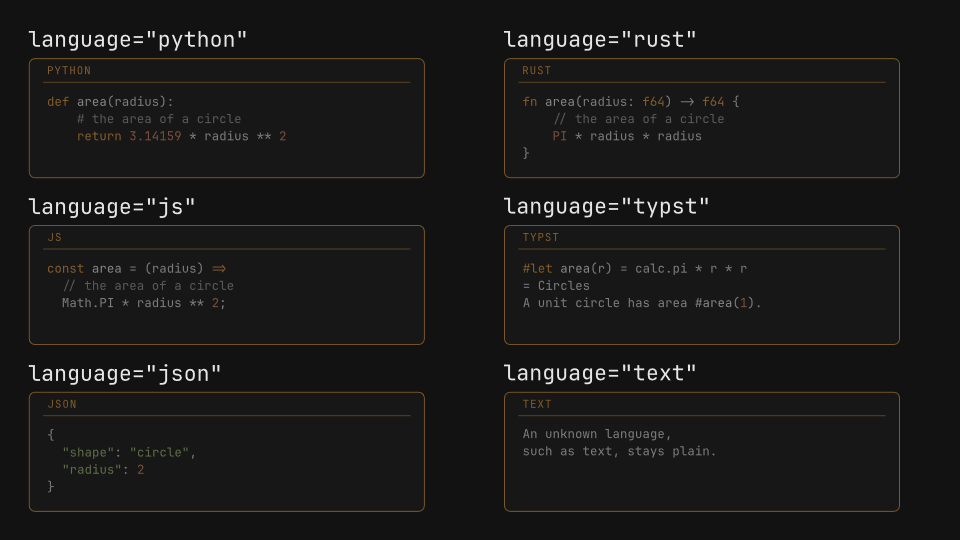
gaanim examples/text/code_blocks.pyCode · 101 lines
"""Code blocks: syntax highlighting by language, color options, a .tmTheme, fonts and sizes.

``scene.text.code(source, language=...)`` draws a code panel: the language
name over a rule and the highlighted source under it, in JetBrains Mono,
bundled with Gaanim. Token colors come from the theme, from a ``.tmTheme``
file or from the ``color``/``accent``/``background`` options. Each label is
the option that builds the panel under it.
"""

import os

from gaanim import Scene, Zones

FADE = 0.6
HOLD = 1.0
PANEL = {"width": 6.6, "height": 2.0, "font_size": 0.26}

PYTHON = "def area(radius):\n    # the area of a circle\n    return 3.14159 * radius ** 2"
SOURCES = {
    "python": PYTHON,
    "rust": "fn area(radius: f64) -> f64 {\n    // the area of a circle\n    PI * radius * radius\n}",
    "js": "const area = (radius) =>\n  // the area of a circle\n  Math.PI * radius ** 2;",
    "typst": "#let area(r) = calc.pi * r * r\n= Circles\nA unit circle has area #area(1).",
    "json": '{\n  "shape": "circle",\n  "radius": 2\n}',
    "text": "An unknown language,\nsuch as text, stays plain.",
}

scene = Scene()
success = scene.canvas.color("success")
muted = scene.canvas.color("muted")
foreground = scene.canvas.color("foreground")


def python(**options):
    """The Python sample as a panel: PANEL with ``options`` on top."""
    return scene.text.code(PYTHON, language="python", **(PANEL | options))


def panels(variants, rows):
    """Fade in one code panel per cell of a rows x 2 grid, each under its label.

    ``variants`` are (label, panel) pairs.
    """
    grid = scene.layout.zones(
        Zones.grid(rows=rows, columns=2, column_gap="96px", row_gap="36px", padding="page_padding")
    )
    for cell, (code, panel) in zip(grid, variants):
        strip, stage = cell.split(Zones.rows(["48px", "1fr"], gap="12px"))
        scene.text(code, role="code").place(strip, anchor="left")
        panel.place(stage, anchor="left")
    scene.play([panel.animate.fade_in().duration(FADE) for _, panel in variants])
    scene.wait(HOLD)


# language is a syntax name or a file extension. Every panel here is
# scene.text.code(source, language=..., **PANEL).
scene.segment("languages")
panels(
    [
        (f'language="{language}"', scene.text.code(source, language=language, **PANEL))
        for language, source in SOURCES.items()
    ],
    rows=3,
)

# highlight=False draws every token in one color; a .tmTheme file brings its
# own token and panel colors; color is the plain text, accent the border, rule
# and language name. On a background where the theme's colors would not read,
# the text and tokens shift until they do. Each label is the change from PANEL.
scene.segment("colors")
panels(
    [
        ("highlight=False", python(highlight=False)),
        ('theme="assets/paper.tmTheme"', python(theme="assets/paper.tmTheme")),
        ("accent=success, color=muted", python(accent=success, color=muted)),
        ("background=foreground", python(background=foreground)),
    ],
    rows=2,
)

# font picks the monospaced family (Typst's bundled DejaVu Sans Mono here);
# font_size scales the code, drawn at 80 % of it, inside a width x height
# panel.
scene.segment("sizes")
panels(
    [
        ('font="DejaVu Sans Mono"', python(font="DejaVu Sans Mono")),
        ("font_size=0.2", python(font_size=0.2)),
        ("font_size=0.32", python(font_size=0.32)),
        ("width=4.8, height=2.6", python(width=4.8, height=2.6)),
    ],
    rows=2,
)

STEP = FADE + HOLD
if snapshots := os.environ.get("GAANIM_SNAPSHOTS"):
    # Fading in and settled in each segment.
    scene.snapshots(snapshots, [STEP * index + t for index in range(3) for t in (0.3, 1.2)])
else:
    scene.render()
Text writing
write() by grapheme, word, line and part, in every order and stagger, and the chalk brush with its seed and roughness.
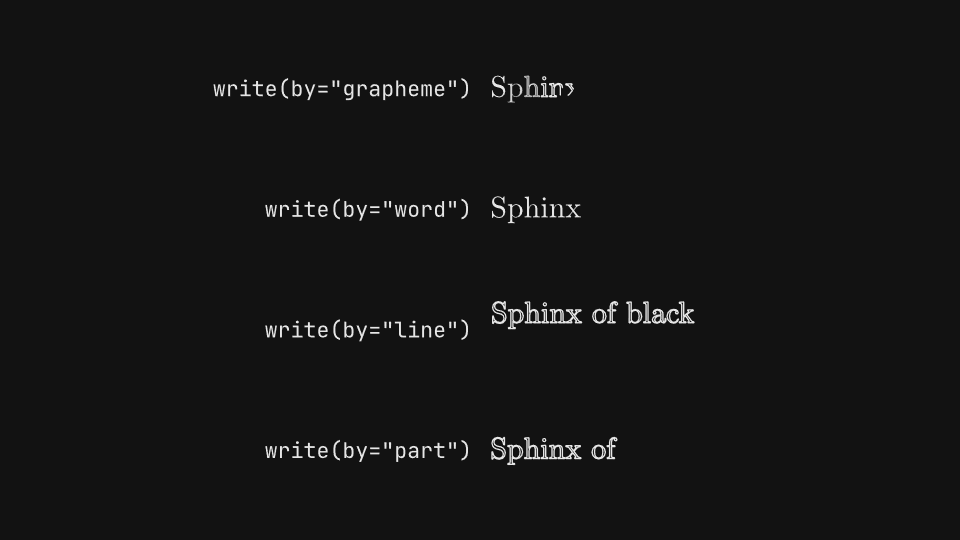
gaanim examples/text/text_writing.pyCode · 101 lines
"""Writing text: write() by unit and order, its stagger, and the chalk brush.

``write`` traces each glyph's outline and then fills it. ``by`` groups the
glyphs that start together, ``order`` picks which group goes first,
``stagger`` sets the lag between groups, and ``brush="chalk"`` (or
``Drawable.chalk``) draws a trembling, grainy chalk line. Each label is the
call that writes the sample next to it.
"""

import os

from gaanim import Scene, Zones, part

DURATION = 1.6
HOLD = 0.6
SAMPLE = "Sphinx of black quartz"
SIZE = 0.5

scene = Scene()


def sample():
    return scene.text(SAMPLE, size=SIZE)


def table(rows, columns=("1fr", "1fr")):
    """Write one sample per row, with the call that writes it as the label.

    ``rows`` are (label, text, write) triples: ``write(text)`` returns the
    sample's animation. ``columns`` are the two column tracks.
    """
    grid = scene.layout.zones(
        Zones.grid(rows=len(rows), columns=list(columns), column_gap="48px", padding="page_padding")
    )
    for index, (code, text, _) in enumerate(rows):
        scene.text(code, role="code").place(grid[2 * index], anchor="right")
        text.place(grid[2 * index + 1], anchor="left")
    scene.play([write(text).duration(DURATION) for _, text, write in rows])
    scene.wait(HOLD)


# Glyphs of one grapheme, word, explicit line or part start together.
scene.segment("units")
table([
    ('write(by="grapheme")', sample(), lambda text: text.animate.write(by="grapheme")),
    ('write(by="word")', sample(), lambda text: text.animate.write(by="word")),
    ('write(by="line")', scene.text("Sphinx of black\nquartz, judge my vow", size=SIZE),
     lambda text: text.animate.write(by="line")),
    ('write(by="part")', scene.text(part("who", "Sphinx"), " of ", part("what", "black quartz"), size=SIZE),
     lambda text: text.animate.write(by="part")),
])

# order picks the first group: forward, reverse, from the center outward,
# or a fixed random permutation.
scene.segment("order")
table(
    [
        (f'write(by="word", order="{order}")', sample(),
         lambda text, order=order: text.animate.write(by="word", order=order))
        for order in ["forward", "reverse", "center", "random"]
    ],
    columns=("4fr", "3fr"),
)

# stagger is the lag ratio between groups: None adapts it, 0 starts every
# group at once and 1 starts each one when the previous one ends.
scene.segment("stagger")
table([
    (f'write(by="word", stagger={stagger})', sample(),
     lambda text, stagger=stagger: text.animate.write(by="word", stagger=stagger))
    for stagger in [None, 0.0, 0.3, 1.0]
])

# brush="chalk" writes with a chalk line whose tremble and grain follow seed;
# Drawable.chalk(seed, roughness) sets the same look before any write.
scene.segment("chalk")
EQUATION = "e^(i pi) + 1 = 0"
BIG = 0.8
table(
    [
        ('write(brush="pen")', scene.text.equation(EQUATION, size=BIG), lambda text: text.animate.write(brush="pen")),
        ('write(brush="chalk", seed=3)', scene.text.equation(EQUATION, size=BIG),
         lambda text: text.animate.write(brush="chalk", seed=3)),
        ('write(brush="chalk", seed=8)', scene.text.equation(EQUATION, size=BIG),
         lambda text: text.animate.write(brush="chalk", seed=8)),
        (".chalk(seed=3, roughness=0)", scene.text("black quartz", size=BIG).chalk(seed=3, roughness=0),
         lambda text: text.animate.write()),
        (".chalk(seed=3)", scene.text("black quartz", size=BIG).chalk(seed=3), lambda text: text.animate.write()),
        (".chalk(seed=3, roughness=0.05)", scene.text("black quartz", size=BIG).chalk(seed=3, roughness=0.05),
         lambda text: text.animate.write()),
    ],
    columns=("1fr", "1fr"),
)

STEP = DURATION + HOLD
if snapshots := os.environ.get("GAANIM_SNAPSHOTS"):
    # Early, mid-write and settled in each of the four segments.
    scene.snapshots(snapshots, [STEP * index + t for index in range(4) for t in (0.4, 0.9, 2.0)])
else:
    scene.render()
Text reveals
Masked slide, fade, scale and blur reveals by unit, blur-in and tracking, selection reveals, and the matching conceal and unwrite exits.
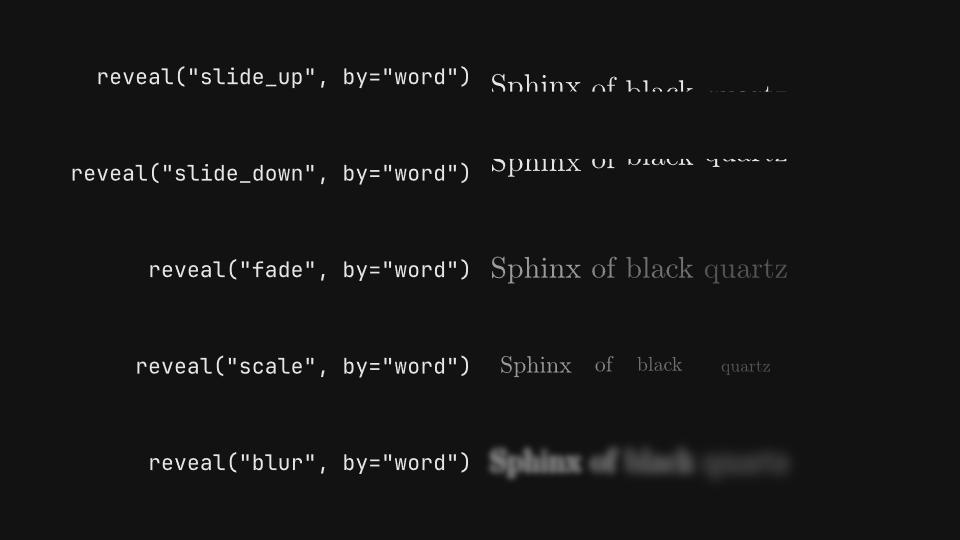
gaanim examples/text/text_reveals.pyCode · 120 lines
"""Text reveals: masked slides, fades, scale and blur, by unit, plus blur-in, tracking and exits.

``reveal`` brings a text in unit by unit (graphemes, words, explicit lines or
parts) with one of five styles, ``blur_in`` and ``tracking`` focus a title,
a selection reveals one term of a text already on screen, and ``conceal`` and
``unwrite`` take text away. Each label is the call that animates the sample
next to it.
"""

import os

from gaanim import Scene, Zones, part

DURATION = 1.2
HOLD = 0.6
SAMPLE = "Sphinx of black quartz"
SHORT = "black quartz"
SIZE = 0.5

scene = Scene()
accent = scene.canvas.color("accent")


def sample():
    return scene.text(SAMPLE, size=SIZE)


def table(rows, columns=("1fr", "1fr"), wait=0.0):
    """Animate one sample per row, with the call that animates it as the label.

    ``rows`` are (label, text, animate) triples: ``animate(text)`` returns the
    sample's animation, or a list of animations that play together.
    ``columns`` are the two column tracks, and ``wait`` holds the samples
    still before they play.
    """
    grid = scene.layout.zones(
        Zones.grid(rows=len(rows), columns=list(columns), column_gap="48px", padding="page_padding")
    )
    for index, (code, text, _) in enumerate(rows):
        scene.text(code, role="code").place(grid[2 * index], anchor="right")
        text.place(grid[2 * index + 1], anchor="left")
    if wait:
        scene.wait(wait)
    anims = []
    for _, text, animate in rows:
        made = animate(text)
        anims += [anim.duration(DURATION) for anim in (made if isinstance(made, list) else [made])]
    scene.play(anims)
    scene.wait(HOLD)


# Five styles; slides rise or fall from behind a mask clipped to each row.
scene.segment("styles")
table([
    (f'reveal("{style}", by="word")', sample(), lambda text, style=style: text.animate.reveal(style, by="word"))
    for style in ["slide_up", "slide_down", "fade", "scale", "blur"]
])

# Units are graphemes, words, explicit lines or parts; mask=False slides
# a shorter way and fades in, and stagger is the delay between units.
scene.segment("units")
LINES = "Sphinx of black\nquartz, judge my vow"
PARTS = (part("who", "Sphinx"), " of ", part("what", "black quartz"))
table([
    ('reveal(by="grapheme")', sample(), lambda text: text.animate.reveal(by="grapheme", stagger=0.03)),
    ('reveal(by="word")', sample(), lambda text: text.animate.reveal(by="word")),
    ('reveal(by="line")', scene.text(LINES, size=SIZE), lambda text: text.animate.reveal(by="line", stagger=0.2)),
    ('reveal(by="part")', scene.text(*PARTS, size=SIZE), lambda text: text.animate.reveal(by="part", stagger=0.2)),
    ('reveal(by="word", mask=False)', sample(), lambda text: text.animate.reveal(by="word", mask=False)),
    ('reveal(by="word", stagger=0.25)', sample(), lambda text: text.animate.reveal(by="word", stagger=0.25)),
])

# blur_in clears a Gaussian blur unit by unit; tracking() closes up glyphs
# spread by text.tracking(...), and combines with blur_in.
scene.segment("focus")
table([
    ("blur_in()", sample(), lambda text: text.animate.blur_in()),
    ("blur_in(sigma=0.8)", sample(), lambda text: text.animate.blur_in(sigma=0.8)),
    ('blur_in(by="word", stagger=0.2)', sample(), lambda text: text.animate.blur_in(by="word", stagger=0.2)),
    ("tracking(0.0)", scene.text(SHORT, size=SIZE).tracking(0.25), lambda text: text.animate.tracking(0.0)),
    ("tracking(0.0) + blur_in()", scene.text(SHORT, size=SIZE).tracking(0.25),
     lambda text: [text.animate.tracking(0.0), text.animate.blur_in()]),
])

# On a selection, reveal brings in only those glyphs, inside a text that is
# already on screen.
scene.segment("selections")
table(
    [
        (f'text["c"].animate.reveal("{style}")', scene.text.equation("a^2 + b^2 = ", part("c", "c^2"), size=0.6),
         lambda text, style=style: text["c"].animate.reveal(style))
        for style in ["fade", "wipe", "from_below"]
    ],
    columns=("3fr", "2fr"),
    wait=0.4,
)

# conceal is the exit that matches reveal; unwrite reverses write.
scene.segment("exits")
table(
    [
        (f'conceal("{style}", by="word")', sample(), lambda text, style=style: text.animate.conceal(style, by="word"))
        for style in ["slide_up", "slide_down", "fade", "scale", "blur"]
    ]
    + [("unwrite()", sample(), lambda text: text.animate.unwrite())],
    wait=0.4,
)

STEP = DURATION + HOLD
if snapshots := os.environ.get("GAANIM_SNAPSHOTS"):
    scene.snapshots(snapshots, [
        # Early, mid-reveal and settled in the first three segments ...
        *[STEP * index + t for index in range(3) for t in (0.3, 0.6, 1.5)],
        # ... and in the two that hold their text still before playing.
        *[3 * STEP + t for t in (0.2, 0.9, 1.9)],
        *[4 * STEP + 0.4 + t for t in (0.2, 1.2, 2.0)],
    ])
else:
    scene.render()
Text animator
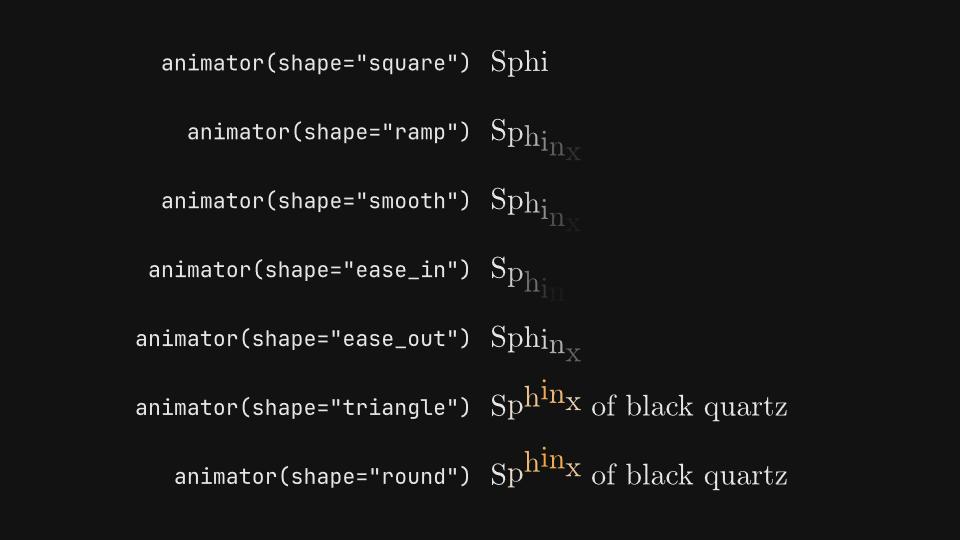
The text range animator: every selector shape, unit order, animated channel, unit type and sweep range.
gaanim examples/text/text_animator.pyCode · 124 lines
"""The text range animator: selector shapes, unit orders, animated channels and sweeps.

``text.animator(by, shape, order, seed)`` selects units of a text,
``set(...)`` defines the state a unit reaches at full influence, and
``animate.sweep()`` moves the selector across the units. Reveal shapes bring
each unit from that state to rest; wave shapes pass through and settle back.
Each label is the call that differs between the animators of a segment.
"""

import os

from gaanim import Scene, Zones, part

DURATION = 1.6
HOLD = 0.5
SAMPLE = "Sphinx of black quartz"
SIZE = 0.5

scene = Scene()
accent = scene.canvas.color("accent")


def sample():
    return scene.text(SAMPLE, size=SIZE)


def table(rows, columns=("1fr", "1fr")):
    """Sweep one animator per row, with the code that builds it as the label.

    ``rows`` are (label, text, build) triples: ``build(text)`` returns the
    sample's animation. ``columns`` are the two column tracks.
    """
    grid = scene.layout.zones(
        Zones.grid(rows=len(rows), columns=list(columns), column_gap="48px", padding="page_padding")
    )
    for index, (code, text, _) in enumerate(rows):
        scene.text(code, role="code").place(grid[2 * index], anchor="right")
        text.place(grid[2 * index + 1], anchor="left")
    scene.play([build(text).duration(DURATION) for _, text, build in rows])
    scene.wait(HOLD)


# Reveal shapes ease each unit in from the out state, here .set(**DROP);
# wave shapes rise to it and settle back, here .set(**LIFT).
scene.segment("shapes")
DROP = {"offset": (0, -0.4), "opacity": 0.0}
LIFT = {"offset": (0, 0.3), "color": accent}
table([
    *[
        (f'animator(shape="{shape}")', sample(),
         lambda text, shape=shape: text.animator(shape=shape).set(**DROP).animate.sweep())
        for shape in ["square", "ramp", "smooth", "ease_in", "ease_out"]
    ],
    *[
        (f'animator(shape="{shape}")', sample(),
         lambda text, shape=shape: text.animator(shape=shape).set(**LIFT).animate.sweep())
        for shape in ["triangle", "round"]
    ],
])

# order sets which unit the range reaches first; "random" is a permutation
# fixed by seed. Every row sets DROP and sweeps once.
scene.segment("order")
table([
    *[
        (f'animator(order="{order}")', sample(),
         lambda text, order=order: text.animator(order=order).set(**DROP).animate.sweep())
        for order in ["forward", "reverse", "center", "random"]
    ],
    ('animator(order="random", seed=5)', sample(),
     lambda text: text.animator(order="random", seed=5).set(**DROP).animate.sweep()),
])

# Every channel set() can animate, one per row, on text.animator().
scene.segment("channels")
CHANNELS = [
    ("offset=(0.4, 0.4)", {"offset": (0.4, 0.4)}),
    ("opacity=0.0", {"opacity": 0.0}),
    ("scale=0.2", {"scale": 0.2}),
    ("rotation=1.2", {"rotation": 1.2}),
    ("blur=0.15", {"blur": 0.15}),
    ("tracking=0.12", {"tracking": 0.12}),
    ("color=accent", {"color": accent}),
]
table(
    [
        (f"set({code})", sample(), lambda text, state=state: text.animator().set(**state).animate.sweep())
        for code, state in CHANNELS
    ],
    columns=("4fr", "5fr"),
)

# The selector walks graphemes, words, explicit lines or parts. Every row
# sets DROP and sweeps once.
scene.segment("units")
table([
    ('animator(by="grapheme")', sample(), lambda text: text.animator(by="grapheme").set(**DROP).animate.sweep()),
    ('animator(by="word")', sample(), lambda text: text.animator(by="word").set(**DROP).animate.sweep()),
    ('animator(by="line")', scene.text("Sphinx of black\nquartz, judge my vow", size=SIZE),
     lambda text: text.animator(by="line").set(**DROP).animate.sweep()),
    ('animator(by="part")', scene.text(part("who", "Sphinx"), " of ", part("what", "black quartz"), size=SIZE),
     lambda text: text.animator(by="part").set(**DROP).animate.sweep()),
])

# sweep(start, end) moves the range between 0 (before the first unit) and 1
# (after the last): sweep(1, 0) plays backward, turning a reveal into an
# exit, and a partial range stops midway. stagger is the delay in seconds between units. Every row sweeps
# text.animator().set(**DROP).
scene.segment("sweeps")
table([
    ("sweep()", sample(), lambda text: text.animator().set(**DROP).animate.sweep()),
    ("sweep(1, 0)", sample(), lambda text: text.animator().set(**DROP).animate.sweep(1, 0)),
    ("sweep(0, 0.5)", sample(), lambda text: text.animator().set(**DROP).animate.sweep(0, 0.5)),
    ("sweep(stagger=0.02)", sample(), lambda text: text.animator().set(**DROP).animate.sweep(stagger=0.02)),
    ("sweep(stagger=0.1)", sample(), lambda text: text.animator().set(**DROP).animate.sweep(stagger=0.1)),
])

STEP = DURATION + HOLD
if snapshots := os.environ.get("GAANIM_SNAPSHOTS"):
    # Early, mid-sweep and settled in each of the five segments.
    scene.snapshots(snapshots, [STEP * index + t for index in range(5) for t in (0.4, 0.9, 1.9)])
else:
    scene.render()
Typewriter
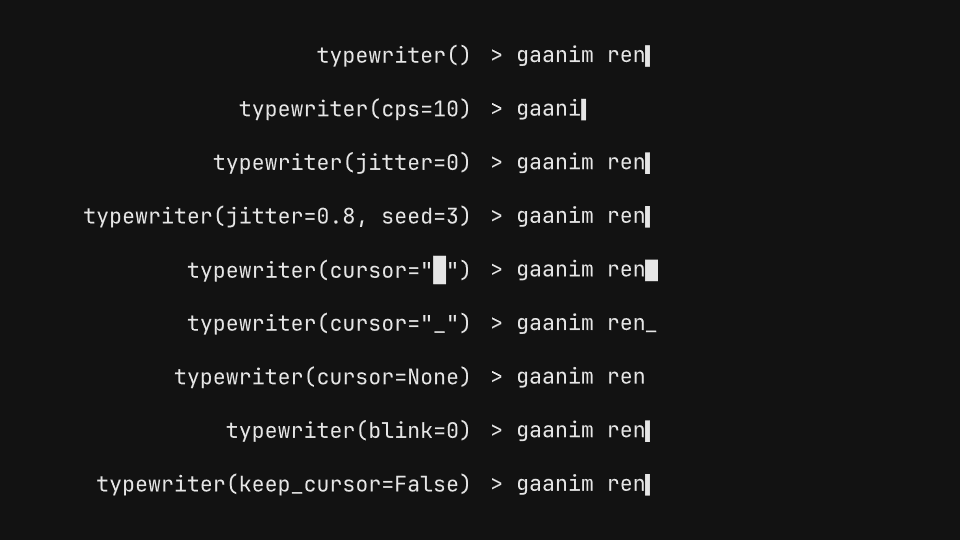
Typewriter speed, jitter, cursors, blinking and kept cursor, then backspace and retype edits of a terminal command.
gaanim examples/text/typewriter.pyCode · 77 lines
"""The typewriter: typing speed, cursors, blinking and jitter, then backspace and retype.

``typewriter`` clears a text and types it again one grapheme per keystroke,
with a cursor after the last one. ``backspace`` deletes from the end and
``retype`` keeps the prefix shared with a new text and types the rest. The
code role's monospaced face keeps the cursor and the columns aligned. Each
label is the call that types the sample next to it.
"""

import os

from gaanim import Scene, Zones

HOLD = 1.0
COMMAND = "> gaanim render --preview"

scene = Scene()


def prompt():
    return scene.text(COMMAND, role="code")


def table(rows, wait=0.0):
    """Play one typing animation per row, with its call as the label.

    ``rows`` are (label, text, type) triples: ``type(text)`` returns the
    sample's animation, which lasts until its last keystroke. ``wait`` holds
    the samples still before they play.
    """
    grid = scene.layout.zones(
        Zones.grid(rows=len(rows), columns=["1fr", "1fr"], column_gap="48px", padding="page_padding")
    )
    for index, (code, text, _) in enumerate(rows):
        scene.text(code, role="code").place(grid[2 * index], anchor="right")
        text.place(grid[2 * index + 1], anchor="left")
    if wait:
        scene.wait(wait)
    scene.play([type_(text) for _, text, type_ in rows])
    scene.wait(HOLD)


# cps is keystrokes per second, jitter varies each interval (fixed by seed),
# and the cursor stays solid while typing, then blinks `blink` times a second.
scene.segment("typing")
table([
    ("typewriter()", prompt(), lambda text: text.animate.typewriter()),
    ("typewriter(cps=10)", prompt(), lambda text: text.animate.typewriter(cps=10)),
    ("typewriter(jitter=0)", prompt(), lambda text: text.animate.typewriter(jitter=0)),
    ("typewriter(jitter=0.8, seed=3)", prompt(), lambda text: text.animate.typewriter(jitter=0.8, seed=3)),
    ('typewriter(cursor="█")', prompt(), lambda text: text.animate.typewriter(cursor="█")),
    ('typewriter(cursor="_")', prompt(), lambda text: text.animate.typewriter(cursor="_")),
    ("typewriter(cursor=None)", prompt(), lambda text: text.animate.typewriter(cursor=None)),
    ("typewriter(blink=0)", prompt(), lambda text: text.animate.typewriter(blink=0)),
    ("typewriter(keep_cursor=False)", prompt(), lambda text: text.animate.typewriter(keep_cursor=False)),
])

# backspace deletes the last graphemes at a steady cps; retype deletes back to
# the prefix it shares with the new text, then types the rest.
scene.segment("editing")
table(
    [
        ("backspace(10)", prompt(), lambda text: text.animate.backspace(10)),
        ("backspace(10, cps=8)", prompt(), lambda text: text.animate.backspace(10, cps=8)),
        ("backspace()", prompt(), lambda text: text.animate.backspace()),
        ('retype("> gaanim export --mp4")', prompt(), lambda text: text.animate.retype("> gaanim export --mp4")),
        ('retype("> gaanim check", cps=8)', prompt(), lambda text: text.animate.retype("> gaanim check", cps=8)),
    ],
    wait=0.6,
)

if snapshots := os.environ.get("GAANIM_SNAPSHOTS"):
    # Mid-typing, typed, and blinking idle; then before, during and after the edits.
    scene.snapshots(snapshots, [0.7, 1.6, 2.9, 3.6, 4.4, 5.6, 7.2])
else:
    scene.render()
Scramble
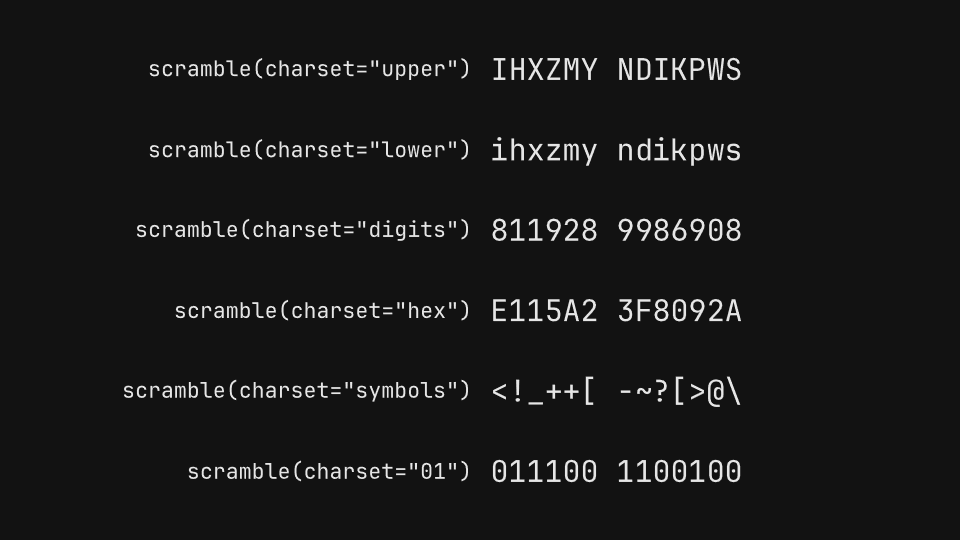
Scramble decoding with every charset, reveal delay, speed and seed, and scramble_to into new text.
gaanim examples/text/scramble.pyCode · 85 lines
"""Scramble: glyphs cycle through a charset and settle left to right, into the text or a new one.

``scramble`` decodes a text: every grapheme shows random glyphs of
``charset``, changing ``speed`` times a second, and after ``reveal_delay``
the graphemes settle from left to right. The final width is reserved from
the first frame, so nothing jumps. ``scramble_to`` decodes into new text.
Each label is the call that decodes the sample next to it.
"""

import os

from gaanim import Scene, Zones

DURATION = 1.6
HOLD = 0.6
CODE = "ACCESS GRANTED"

scene = Scene()


def sample(content=CODE):
    return scene.text(content, role="code", size=0.5)


def table(rows, columns=("1fr", "1fr"), wait=0.0):
    """Decode one sample per row, with the call that decodes it as the label.

    ``rows`` are (label, text, decode) triples: ``decode(text)`` returns the
    sample's animation. ``columns`` are the two column tracks, and ``wait``
    holds the samples still before they play.
    """
    grid = scene.layout.zones(
        Zones.grid(rows=len(rows), columns=list(columns), column_gap="48px", padding="page_padding")
    )
    for index, (code, text, _) in enumerate(rows):
        scene.text(code, role="code").place(grid[2 * index], anchor="right")
        text.place(grid[2 * index + 1], anchor="left")
    if wait:
        scene.wait(wait)
    scene.play([decode(text).duration(DURATION) for _, text, decode in rows])
    scene.wait(HOLD)


# A named charset, or any literal string of glyphs to cycle through.
scene.segment("charsets")
table([
    (f'scramble(charset="{charset}")', sample(), lambda text, charset=charset: text.animate.scramble(charset=charset))
    for charset in ["upper", "lower", "digits", "hex", "symbols", "01"]
])

# reveal_delay is the time before the first grapheme settles; speed is how
# many times a second the random glyphs change; seed picks them.
scene.segment("timing")
table([
    ("scramble(reveal_delay=0)", sample(), lambda text: text.animate.scramble(reveal_delay=0)),
    ("scramble(reveal_delay=1)", sample(), lambda text: text.animate.scramble(reveal_delay=1)),
    ("scramble(speed=4)", sample(), lambda text: text.animate.scramble(speed=4)),
    ("scramble(speed=40)", sample(), lambda text: text.animate.scramble(speed=40)),
    ("scramble(seed=7)", sample(), lambda text: text.animate.scramble(seed=7)),
])

# scramble_to decodes a text already on screen into new text.
scene.segment("scramble_to")
table(
    [
        ('scramble_to("ACCESS DENIED")', sample(), lambda text: text.animate.scramble_to("ACCESS DENIED")),
        ('scramble_to("LOCKED", charset="01")', sample(),
         lambda text: text.animate.scramble_to("LOCKED", charset="01")),
        ('scramble_to("WAIT 30", charset="digits")', sample(),
         lambda text: text.animate.scramble_to("WAIT 30", charset="digits")),
    ],
    columns=("3fr", "2fr"),
    wait=0.4,
)

STEP = DURATION + HOLD
if snapshots := os.environ.get("GAANIM_SNAPSHOTS"):
    # Scrambling, settling and decoded in each segment.
    scene.snapshots(snapshots, [
        *[STEP * index + t for index in range(2) for t in (0.2, 0.9, 1.9)],
        *[2 * STEP + t for t in (0.2, 0.8, 1.5, 2.3)],
    ])
else:
    scene.render()
Text on path
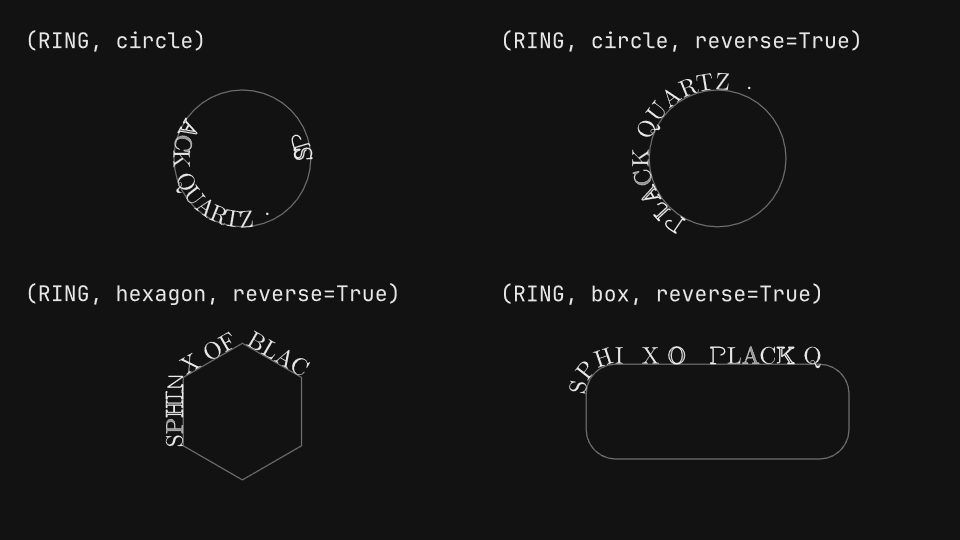
Text along closed and open paths with align, orient, reverse and offset, and path_offset animations that spin and slide it.
gaanim examples/text/text_on_path.pyCode · 133 lines
"""Text on a path: closed and open paths, alignment, orientation, direction and offset.

``scene.text.on_path(content, path, ...)`` places one line of text along the
outline of another drawable: around a circle, a polygon or a rounded
rectangle, along an open wave or arc. ``align``, ``orient``, ``reverse``
and ``offset`` place the glyphs, and ``animate.path_offset`` slides them
along the path. Each label lists the arguments of ``on_path`` that build
the sample under it, or the animation that moves it.
"""

import math
import os

from gaanim import Easing, Scene, Zones

DURATION = 2.4
HOLD = 0.6
RING = "SPHINX OF BLACK QUARTZ · "
LINE = "Sphinx of black quartz"

scene = Scene()
accent = scene.canvas.color("accent")
rule = scene.canvas.color("rule")


def cells(rows):
    """A rows x 2 grid; each cell is split into a label strip and a stage under it."""
    grid = scene.layout.zones(
        Zones.grid(rows=rows, columns=2, column_gap="96px", row_gap="48px", padding="page_padding")
    )
    return [cell.split(Zones.rows(["48px", "1fr"], gap="12px")) for cell in grid]


def outline(shape):
    """Draw a path as a thin rule, so the text along it stays readable."""
    return shape.no_fill().stroke(rule, 0.02)


def wave(stage):
    """An open S-curve across ``stage``, left to right."""
    (x0, y), (x1, _) = stage.point("left"), stage.point("right")
    third = (x1 - x0) / 3
    return outline(scene.geometry.path([
        ("move", [(x0, y)]),
        ("cubic", [(x0 + third, y + 1.4), (x1 - third, y - 1.4), (x1, y)]),
    ]))


def smile(stage):
    """An arc along the bottom of a circle, rising to the right at 45 degrees."""
    x, y = stage.center
    return outline(scene.geometry.arc(x, y + 0.9, 1.6, math.pi * 1.25, math.pi * 0.5))


def around(stage, shape, **options):
    """RING along ``shape``, a closed path centered in ``stage``."""
    return scene.text.on_path(RING, outline(shape.move_to(*stage.center)), **options)


def show(variants):
    """Label each (label, build) variant; ``build(stage)`` draws its path and text."""
    texts = []
    for (strip, stage), (code, build) in zip(cells(len(variants) // 2), variants):
        scene.text(code, role="code").place(strip, anchor="left")
        texts.append(build(stage))
    return texts


# Glyphs sit to the left of the direction of travel. A circle runs
# counterclockwise, so text reads around the inside; reverse=True follows
# the path backward and puts it around the outside.
scene.segment("closed")
RADIUS = 1.15
texts = show([
    ("(RING, circle)", lambda stage: around(stage, scene.geometry.circle(RADIUS))),
    ("(RING, circle, reverse=True)", lambda stage: around(stage, scene.geometry.circle(RADIUS), reverse=True)),
    ("(RING, hexagon, reverse=True)",
     lambda stage: around(stage, scene.geometry.regular_polygon(6, RADIUS), reverse=True)),
    ("(RING, box, reverse=True)",
     lambda stage: around(stage, scene.geometry.rounded_rect(4.4, 1.6, 0.5), reverse=True)),
])
scene.play([text.animate.write().duration(DURATION / 2) for text in texts])
scene.wait(HOLD)

# On an open path, align places the text at its start, middle or end;
# orient=False keeps glyphs upright and offset shifts the text by a fraction
# of the path's length.
scene.segment("open")
texts = show([
    ("(LINE, wave)", lambda stage: scene.text.on_path(LINE, wave(stage))),
    ('(LINE, wave, align="center")', lambda stage: scene.text.on_path(LINE, wave(stage), align="center")),
    ('(LINE, wave, align="end")', lambda stage: scene.text.on_path(LINE, wave(stage), align="end")),
    ("(LINE, wave, orient=False)", lambda stage: scene.text.on_path(LINE, wave(stage), orient=False)),
    ("(LINE, wave, offset=0.25)", lambda stage: scene.text.on_path(LINE, wave(stage), offset=0.25)),
    ("(LINE, wave, reverse=True)", lambda stage: scene.text.on_path(LINE, wave(stage), reverse=True)),
])
scene.play([text.animate.write().duration(DURATION / 2) for text in texts])
scene.wait(HOLD)

# animate.path_offset slides the glyphs along the path: one full turn of a
# closed path is 1.0, and on an open path (here the bottom of a circle)
# glyphs past the end go straight on. Text.path_offset(-0.3) sets the wave's
# starting offset, and on_path takes the style keywords of scene.text, like
# color=accent.
scene.segment("motion")
spin, slide, past, styled = show([
    ("animate.path_offset(1.0)", lambda stage: around(stage, scene.geometry.circle(RADIUS), reverse=True)),
    ("animate.path_offset(0.3)",
     lambda stage: scene.text.on_path(LINE, wave(stage), align="center").path_offset(-0.3)),
    ("animate.path_offset(0.6)",
     lambda stage: scene.text.on_path("black quartz", smile(stage))),
    ("animate.path_offset(-1.0)",
     lambda stage: around(stage, scene.geometry.circle(RADIUS), reverse=True, color=accent)),
])
scene.play([
    spin.animate.path_offset(1.0).duration(DURATION).easing(Easing.LINEAR),
    slide.animate.path_offset(0.3).duration(DURATION),
    past.animate.path_offset(0.6).duration(DURATION),
    styled.animate.path_offset(-1.0).duration(DURATION).easing(Easing.LINEAR),
])
scene.wait(HOLD)

STEP = DURATION / 2 + HOLD
if snapshots := os.environ.get("GAANIM_SNAPSHOTS"):
    scene.snapshots(snapshots, [
        # Mid-write and settled in the two layout segments ...
        0.6, 1.7, STEP + 0.6, STEP + 1.7,
        # ... and four moments of the motion.
        *[2 * STEP + t for t in (0.1, 0.9, 1.7, 2.9)],
    ])
else:
    scene.render()
Typst layouts
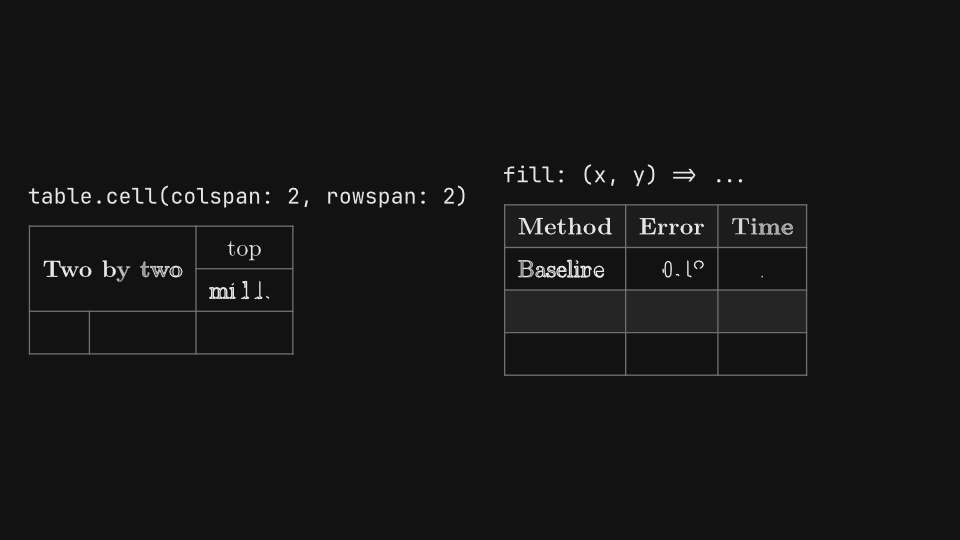
Typst documents as drawables: tables with merged cells and computed fills, grids and columns, aligned math, page widths and a .typ file.
gaanim examples/text/typst_layouts.pyCode · 149 lines
"""Typst documents: tables, grids and columns, aligned math, page widths and .typ files.

``scene.text.typst(source)`` compiles a whole Typst document into one
drawable, for layouts a ``Text`` cannot express: tables with merged cells,
grids and columns, multi-line aligned equations, wrapped paragraphs at a
page ``width``, and documents loaded from a ``.typ`` file. Its text is as
large as the body role at Typst's default 11pt. Each label is the Typst
feature or option that builds the document under it.
"""

import os
from pathlib import Path

from gaanim import Scene, Zones

WRITE = 1.6
HOLD = 1.0
GAP = 0.3

scene = Scene()


# Typst draws text in the theme's foreground, and every document starts with
# the theme's colors as the dictionary `theme`: a preamble strokes tables,
# rectangles and lines with its rule color.
THEME = """
#set table(stroke: 0.6pt + theme.rule, inset: 6pt)
#set rect(stroke: 0.6pt + theme.rule)
#set line(stroke: 0.6pt + theme.rule)
"""


def document(source, **options):
    return scene.text.typst(THEME + source, **options)


def pages(variants):
    """Write two documents side by side, each under its label; ``variants`` are (label, document) pairs."""
    grid = scene.layout.zones(Zones.grid(rows=1, columns=2, column_gap="96px", padding="page_padding"))
    for cell, (code, drawable) in zip(grid, variants):
        name = scene.text(code, role="code")
        # A band as tall as the label, a gap and the document, centered in the cell.
        height = name.bounds().height + GAP + drawable.bounds().height
        band = cell.inset(((cell.height - height) / 2, 0))
        name.place(band, anchor="top_left")
        drawable.place(band, anchor="bottom_left")
    scene.play([drawable.animate.write().duration(WRITE) for _, drawable in variants])
    scene.wait(HOLD)


# Tables: cells that span columns and rows, a header, per-cell alignment and
# fills computed from the cell position.
scene.segment("tables")
pages([
    ("table.cell(colspan: 2, rowspan: 2)", document("""
#table(
  columns: (auto, auto, auto),
  align: center + horizon,
  table.cell(colspan: 2, rowspan: 2)[*Two by two*], [top],
  [middle],
  [left], [center], [right],
)
""")),
    ("fill: (x, y) => ...", document("""
#table(
  columns: (auto, auto, auto),
  align: (left, right, right),
  fill: (x, y) => if y == 0 { theme.panel } else if calc.even(y) { theme.panel.lighten(4%) },
  table.header([*Method*], [*Error*], [*Time*]),
  [Baseline], [0.18], [12 s],
  [Adaptive], [0.07], [19 s],
  [GPU], [0.04], [2 s],
)
""")),
])

# Grids and columns lay out blocks side by side. Their 1fr tracks share the
# page width, so both documents pass width="6cm" (Typst units before
# scaling: at the body size, 6cm is about 6 scene units). Columns fill a
# block of fixed height, then flow into the next column.
scene.segment("grids")
pages([
    ("#grid(columns: (1fr, 2fr))", document("""
#grid(
  columns: (1fr, 2fr),
  gutter: 8pt,
  rect(width: 100%, height: 2.4cm)[*Figure*],
  rect(width: 100%, height: 2.4cm, stroke: 0.6pt + theme.accent)[A wider column takes two shares of the width.],
)
""", width="6cm")),
    ("#columns(2)", document("""
#set par(justify: true)
#block(height: 2.4cm, columns(2, gutter: 10pt)[
  Text in two columns flows from the bottom of the first column into
  the top of the second, like a printed page: the first column fills
  before the second one starts.
])
""", width="6cm")),
])

# Math beyond one line: aligned steps with & and \, cases and matrices.
scene.segment("math")
pages([
    ("$ a &= b \\ &= c $", document("""
$ (a + b)^2 &= (a + b)(a + b) \\
            &= a^2 + a b + b a + b^2 \\
            &= a^2 + 2 a b + b^2 $
""")),
    ("cases(...) and mat(...)", document("""
$ |x| = cases(x &"if" x >= 0, -x &"if" x < 0) $
$ R(theta) = mat(cos theta, -sin theta; sin theta, cos theta) $
""")),
])

# width is the Typst page width before scaling: paragraphs wrap at it and
# #align(center) centers within it. Without width the page fits its content.
scene.segment("pages")
PARAGRAPH = """
#set par(justify: true)
#align(center)[*Page width*]
The same paragraph wraps at the page width that the width option sets,
measured before the document is scaled to the scene.
"""
pages([
    ('width="3.5cm"', document(PARAGRAPH, width="3.5cm")),
    ('width="6cm"', document(PARAGRAPH, width="6cm")),
])

# A Path loads a .typ file, resolved in assets/. #set text(size: ...)
# scales a document: 22pt is twice the body size.
scene.segment("files")
pages([
    ('Path("assets/note.typ")', scene.text.typst(Path("assets/note.typ"), width="6cm")),
    ("#set text(size: 22pt)", document("""
#set text(size: 22pt)
*Vector motion*
#set text(size: 11pt)

at the body size
""")),
])

STEP = WRITE + HOLD
if snapshots := os.environ.get("GAANIM_SNAPSHOTS"):
    # Mid-write and settled in each segment.
    scene.snapshots(snapshots, [STEP * index + t for index in range(5) for t in (0.8, 2.2)])
else:
    scene.render()
Typst packages
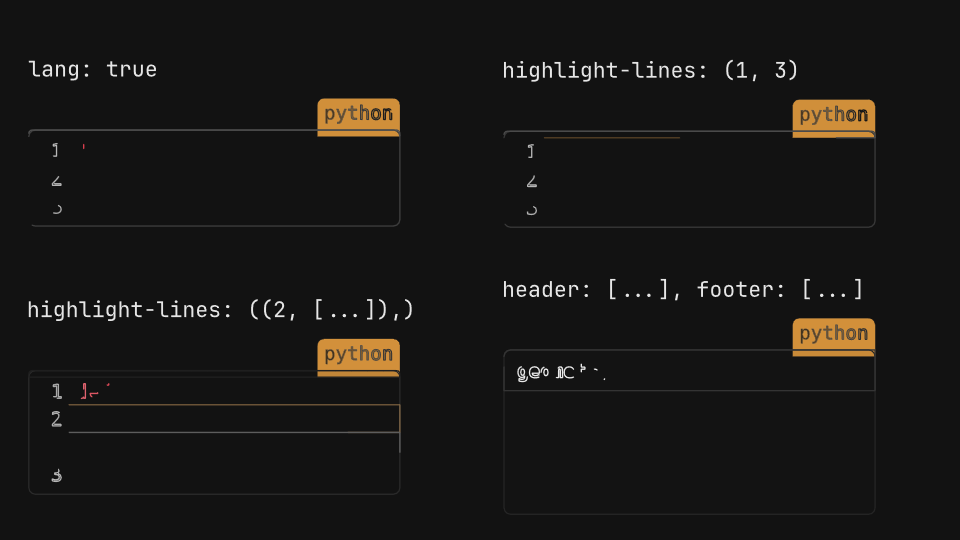
Typst Universe packages in a scene: zebraw code listings and simple-plot function plots, styled with the theme's colors.
Code · 132 lines
"""Typst Universe packages: zebraw code listings and simple-plot function plots.

A Typst document compiled with ``scene.text.typst`` can import any package
from Typst Universe with ``#import "@preview/name:version"``; Gaanim fetches
it the first time and caches it. Here zebraw numbers, highlights and
annotates code listings, and simple-plot draws function plots. The theme's
colors are passed into each package's options. Each label is the package
option that builds the document under it.
"""

import os

from gaanim import Scene, Zones

WRITE = 1.6
HOLD = 1.0
GAP = 0.3

scene = Scene()


# Packages are made for white paper and pick black and white themselves:
# their options take the theme's colors from `theme`, the dictionary every
# Typst document starts with. zebraw's colors; each listing adds its own
# options.
ZEBRAW = """
#import "@preview/zebraw:0.6.3": *
#let listing = zebraw.with(
  background-color: theme.panel,
  highlight-color: theme.accent.transparentize(75%),
  comment-color: theme.panel.lighten(6%),
  lang-color: theme.accent,
  lang-font-args: (fill: theme.background),
  numbering-font-args: (fill: theme.muted),
)
"""
CODE = """```python
def area(r):
    # the area of a circle
    return pi * r * r
```"""

# simple-plot's axes, grid, ticks and labels, from the theme.
PLOT = """
#import "@preview/simple-plot:1.0.0": plot
#let themed = (
  axis: (stroke: theme.rule + 0.8pt, arrow: (symbol: "stealth", fill: theme.rule, scale: 0.55)),
  grid: (major: (stroke: theme.panel.lighten(8%) + 0.5pt), minor: (stroke: theme.panel + 0.3pt)),
  ticks: (stroke: theme.rule + 0.6pt, label-fill: theme.muted, label-bg: none),
  labels: (fill: theme.foreground, bg: none),
)
"""


def pages(variants, rows=1, write=True):
    """Show documents in a rows x 2 grid, each under its label; ``variants`` are (label, document) pairs.

    The documents are written, or faded in when ``write`` is false.
    """
    grid = scene.layout.zones(
        Zones.grid(rows=rows, columns=2, column_gap="96px", row_gap="48px", padding="page_padding")
    )
    for cell, (code, drawable) in zip(grid, variants):
        name = scene.text(code, role="code")
        # A band as tall as the label, a gap and the document, centered in the cell.
        height = name.bounds().height + GAP + drawable.bounds().height
        band = cell.inset(((cell.height - height) / 2, 0))
        name.place(band, anchor="top_left")
        drawable.place(band, anchor="bottom_left")
    scene.play([
        (drawable.animate.write() if write else drawable.animate.fade_in()).duration(WRITE)
        for _, drawable in variants
    ])
    scene.wait(HOLD)


# zebraw numbers the lines of a raw block and tags its language; it can
# highlight lines, attach a comment to one, and add a header and a footer.
# Each label is an option of listing, the themed zebraw above.
scene.segment("zebraw")
pages(
    [
        ("lang: true", scene.text.typst(ZEBRAW + f"#listing(lang: true)[{CODE}]", width="6cm")),
        ("highlight-lines: (1, 3)",
         scene.text.typst(ZEBRAW + f"#listing(highlight-lines: (1, 3))[{CODE}]", width="6cm")),
        ("highlight-lines: ((2, [...]),)",
         scene.text.typst(ZEBRAW + f"#listing(highlight-lines: ((2, [Comments never run.]),))[{CODE}]", width="6cm")),
        ("header: [...], footer: [...]",
         scene.text.typst(ZEBRAW + f"#listing(header: [*geometry.py*], footer: [3 lines])[{CODE}]", width="6cm")),
    ],
    rows=2,
)

# simple-plot draws functions (fn:) between axis limits, with ticks, grids
# and labels; xtick-labels can name ticks with math.
scene.segment("simple-plot")
pages([
    ("plot((fn: ...), (fn: ...))", scene.text.typst(PLOT + """
#plot(
  style: themed,
  xmin: -3, xmax: 3, ymin: -0.5, ymax: 4,
  width: 6, height: 4,
  xlabel: $x$, ylabel: $y$,
  show-grid: "major",
  show-origin: false,
  (fn: x => x * x, stroke: theme.accent + 1.2pt, label: $x^2$),
  (fn: x => calc.exp(x) / 4, stroke: theme.success + 1.2pt, label: $e^x / 4$),
)
""")),
    ("xtick-labels: ($-pi$, $pi$)", scene.text.typst(PLOT + """
#plot(
  style: themed,
  xmin: -2 * calc.pi, xmax: 2 * calc.pi, ymin: -1.5, ymax: 1.5,
  width: 5.2, height: 3,
  xlabel: $x$, ylabel: $y$,
  show-grid: "major",
  show-origin: false,
  xtick: (-calc.pi, calc.pi),
  xtick-labels: ($-pi$, $pi$),
  (fn: x => calc.sin(x), stroke: theme.accent + 1.2pt, samples: 200, label: $sin(x)$),
  (fn: x => calc.cos(x), stroke: theme.success + 1.2pt, samples: 200, label: $cos(x)$),
)
""")),
], write=False)

STEP = WRITE + HOLD
if snapshots := os.environ.get("GAANIM_SNAPSHOTS"):
    # Early, mid-entrance and settled in each segment.
    scene.snapshots(snapshots, [STEP * index + t for index in range(2) for t in (0.3, 0.8, 2.2)])
else:
    scene.render()